AI Term of the Moment
hybrid AI
Definition: CLC Dev
(Computer Language Company Development) CLC Dev entries document the development system for this encyclopedia. This is an a-to-z dictionary creation system that supports images.
This Is for A-to-Z Entries
XyWrite and CDE are custom programmed for entries in alphabetical order from a to z. After editing a term, it takes less than 10 seconds to see the content completely rendered with images. CDE can be used as often as necessary, and it supports a large selection of fonts.
XyWrite and CDE (editor.exe and cde.exe)
XyWrite is used to edit dot-x files; for example, from a.x to 123.x. Seven large files are split (a.x, a2.x, c.x, c2.x): ACDMPSW because XyWrite gets a little squirely with very large files (XyWrite was written in the days of DOS and early Windows). Sounds terrible, but it isn't! Following are the first three terms in both programs.
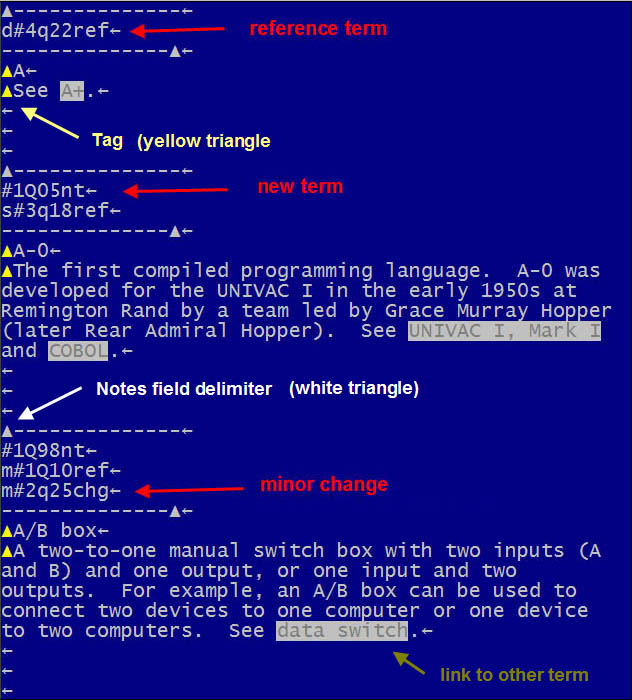
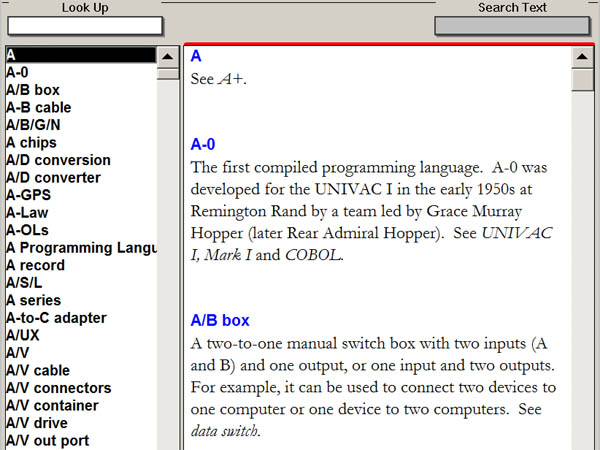
White Triangles - Change Dates
Yellow Triangles - Format Tags
The yellow triangles define term, body text and start/stop monospaced text (used for lists and tables). Pictures and captions are defined with other codes (see CLC Dev Images and Tables).
.X to CDE
GENDX2.EXE (g.cmd shortcut) converts all .x files to the four CDE database files (cde.abc, cde.ndx, cde.par and cde.txt). See CLC Dev Date Stamps.
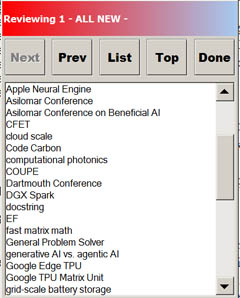
MAKELSN.EXE - Make Lessons (Review Lists)
Anything Can Be Stored in the Notes Field
When the XyWrite files are converted to XML for Web deployment, all Notes fields are deleted. Therefore, anything can be stored in Notes. For example, #ai and #crypto are tags entered in the Notes field that are counted for lists of AI and crypto terms (see CLC Dev Maintenance).
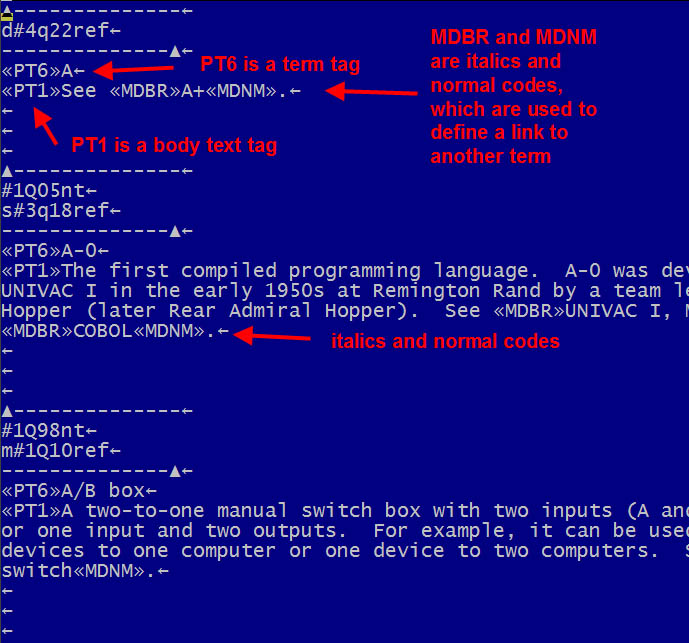
Inside the Yellow Triangles
This Is for A-to-Z Entries
XyWrite and CDE are custom programmed for entries in alphabetical order from a to z. After editing a term, it takes less than 10 seconds to see the content completely rendered with images. CDE can be used as often as necessary, and it supports a large selection of fonts.
XyWrite and CDE (editor.exe and cde.exe)
XyWrite is used to edit dot-x files; for example, from a.x to 123.x. Seven large files are split (a.x, a2.x, c.x, c2.x): ACDMPSW because XyWrite gets a little squirely with very large files (XyWrite was written in the days of DOS and early Windows). Sounds terrible, but it isn't! Following are the first three terms in both programs.
White triangles (top) are tags that start and end the Notes field, which holds the change dates. When a new term is entered (Ctrl-N), the Notes field is automatically created with the current date. If change history is required, after an edit, the change date must be manually inserted.
Yellow Triangles - Format Tags
The yellow triangles define term, body text and start/stop monospaced text (used for lists and tables). Pictures and captions are defined with other codes (see CLC Dev Images and Tables).
.X to CDE
GENDX2.EXE (g.cmd shortcut) converts all .x files to the four CDE database files (cde.abc, cde.ndx, cde.par and cde.txt). See CLC Dev Date Stamps.
MAKELSN.EXE generates ALL NEW, MAJOR, MINOR and REVS "Lesson" lists from the current date stamps. These are stored in c:\x\lessons, and selecting Lessons in CDE displays the lists. Clicking a term in the list looks up the definition. See CLC Dev Date Stamps.
Anything Can Be Stored in the Notes Field
When the XyWrite files are converted to XML for Web deployment, all Notes fields are deleted. Therefore, anything can be stored in Notes. For example, #ai and #crypto are tags entered in the Notes field that are counted for lists of AI and crypto terms (see CLC Dev Maintenance).
Control-? toggles between triangles and tags. <<PT6>> is the tag for term name and <<PT1>> is the tag for the body text (see CLC Dev Tag Summary). In addition, because text in XyWrite is monospaced, an extra blank space is easily recognized, giving editors great control over final output.