AI Term of the Moment
AI system
Redirected from: hexidecimal
Definition: hex
(HEXadecimal) Meaning 16, hex is shorthand for eight-bit binary characters, or bytes, which is the representation of data in all modern computers.
Why Hex?
In order to debug an application, programmers often look closely at the resulting data. Although letters and digits are easily viewed, there are returns, line feeds and other special characters that may be part of the output. In addition, erroneous characters might have been created resulting in any binary configuration, but reading a binary number comprising eight 1s and 0s is tedious. However, there is no misinterpreting the contents of a byte when it is identified in hex. See byte, octal, binary values and hex editor.

A Hex Readout
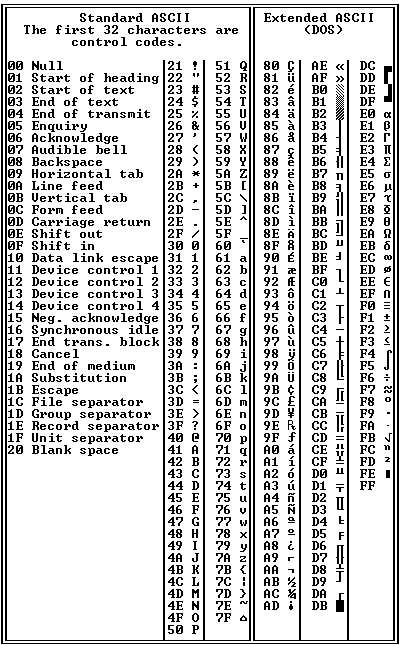
All 256 Hex Characters
Why Hex?
In order to debug an application, programmers often look closely at the resulting data. Although letters and digits are easily viewed, there are returns, line feeds and other special characters that may be part of the output. In addition, erroneous characters might have been created resulting in any binary configuration, but reading a binary number comprising eight 1s and 0s is tedious. However, there is no misinterpreting the contents of a byte when it is identified in hex. See byte, octal, binary values and hex editor.
In this UltraEdit hex editor example, the hex interpretation of the word "encyclopedia" is highlighted. Although text is easy to read in its normal form, a hex editor reveals the actual binary value of every character in the data.
    Base 2   Base 16  Base 10
    Binary     Hex      Dec

     0000       0        0
     0001       1        1
     0010       2        2
     0011       3        3
     0100       4        4
     0101       5        5
     0110       6        6
     0111       7        7
     1000       8        8
     1001       9        9
     1010       A       10
     1011       B       11
     1100       C       12
     1101       D       13
     1110       E       14
     1111       F       15
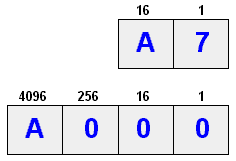
 Hex A7 is equal to:
  decimal 167 (10 x 16 + 7 x 1)
       or
  binary 10100111 (128 + 32 + 4 + 2 + 1)

 Hex A000 is equal to:
  decimal 40,960 (10 x 4096)
    or
  binary 1010000000000000 (32768+8192)
There is a maximum of 256 values in an 8-bit byte, and this chart shows the hex shorthand for all possible characters. Very often, programmers must look at corrupted data, and because all data reside in binary format, hex values ensure there is no misinterpretation. Binary is all there is, and the hex editor reveals the binary pattern without having to look at eight 0s and 1s. See binary values and hex editor.