AI Term of the Moment
Microsoft Azure
Redirected from: CLC Dev Chekrefs
Definition: CLC Dev Maintenance
There are several utilities for managing the encyclopedia. Most of them are currently 16-bit Turbo C programs in the c:\tc folder. They can all be converted to 32-bit utilities. The exception is the following gendx2.exe, which is a 32-bit Visual Studio utility.
Generate CDE for Review (G.cmd and gn.cmd)
G.CMD converts all .x files to CDE without the Notes field. To review edit history, GN.CMD keeps the Notes. These two command files execute GENDX2.EXE, which generates the Windows CDE database: CDE.ABC, CDE.NDX, CDE.PAR and CDE.TXT. CDE.EXE requires all four files.
Count Something (Count.exe)
COUNT.EXE in the X folder counts items in all the XyWrite files. For example, "count (5)" totals how many terms have five definitions. "Count #ai" totals all the AI terms, providing that you add "#ai" to the Notes field when you create a new AI term. Remember, you can store anything in the Notes field. It is deleted for Web deployment.
Where Is Something? (Where.exe)
SEARCH TEXT in CDE is used to search text but not file names. WHERE.EXE looks for text matches; for example, "where tranlayer.jpg" shows which terms the tranlayer.jpg image is used in.
Do Links Have a Valid Target? (Chekrefs.cmd)
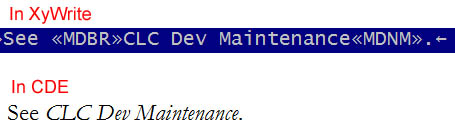
CHEKREFS.CMD ensures that a term exists for every link. In XyWrite, links display as white-on-blue text in the Mode Bold Reverse format (<<MDBR>> and <<MDNM>>). They render as italics in CDE as follows:
Do All Images Exist? (Chekpix.exe)
CHEKPIX.EXE ensures that all image references in the text have a file in folders c:\n or c:\2. Folder c:\1 contains metafiles (.wmf), which CDE supports but are no longer added. All WMFs have been converted to GIFs and when .x files are converted to XML, all references to WMFs are changed to GIFs, which are in c:\2.
Test for Duplicate Names (Xml2sqliteVer2.exe)
XML2SQLITEVER2.EXE tests for duplicate term names with different spelling; for example, "database" and "data base." In such a case, one of them must be identified as a punctuation reference. If neither term is identified as such, an error is flagged. For details, see CLC Dev Punctuation.
Generate CDE for Review (G.cmd and gn.cmd)
G.CMD converts all .x files to CDE without the Notes field. To review edit history, GN.CMD keeps the Notes. These two command files execute GENDX2.EXE, which generates the Windows CDE database: CDE.ABC, CDE.NDX, CDE.PAR and CDE.TXT. CDE.EXE requires all four files.
Count Something (Count.exe)
COUNT.EXE in the X folder counts items in all the XyWrite files. For example, "count (5)" totals how many terms have five definitions. "Count #ai" totals all the AI terms, providing that you add "#ai" to the Notes field when you create a new AI term. Remember, you can store anything in the Notes field. It is deleted for Web deployment.
Where Is Something? (Where.exe)
SEARCH TEXT in CDE is used to search text but not file names. WHERE.EXE looks for text matches; for example, "where tranlayer.jpg" shows which terms the tranlayer.jpg image is used in.
Do Links Have a Valid Target? (Chekrefs.cmd)
CHEKREFS.CMD ensures that a term exists for every link. In XyWrite, links display as white-on-blue text in the Mode Bold Reverse format (<<MDBR>> and <<MDNM>>). They render as italics in CDE as follows:
Do All Images Exist? (Chekpix.exe)
CHEKPIX.EXE ensures that all image references in the text have a file in folders c:\n or c:\2. Folder c:\1 contains metafiles (.wmf), which CDE supports but are no longer added. All WMFs have been converted to GIFs and when .x files are converted to XML, all references to WMFs are changed to GIFs, which are in c:\2.
Test for Duplicate Names (Xml2sqliteVer2.exe)
XML2SQLITEVER2.EXE tests for duplicate term names with different spelling; for example, "database" and "data base." In such a case, one of them must be identified as a punctuation reference. If neither term is identified as such, an error is flagged. For details, see CLC Dev Punctuation.